Showing posts with label Integrating Technology. Show all posts
Showing posts with label Integrating Technology. Show all posts
Wednesday, June 4, 2014

Monday, January 20, 2014
I have my Google Glass, now what?
First of all, let me say that my Google Glass headset is pretty darn awesome. The fact that I can see this little screen that offers me so much information is incredibly amazing. I can call, text, Google, take pictures and videos all hands free. This little computer has an earpiece that records your voice and transmits audio through the skull. Glass is definitely revolutionary in every way. The tasks aren't all fun, they are functional too. I even have Evernote installed so that if I am walking around and don't want to forget an idea, I just say,"Go Glass, note," and it writes what I say and sends it to Evernote.

I feel very fortunate to be able to test and work with glass, but my first intention has always been, how can I (and others) use it for learning purposes. I follow Two Guys and Some iPads and their last blog post mentioned how some educators are using Google Glass right now.
They quoted Stacey Goodman who wrote a great piece saying "Google Glass provides the educator a means for "making learning visible" (MLV), and can assist with the "observation and documentation in deepening and extending children's and adults' learning" that the Project Zero researches from Harvard and Reggio Emilia, who developed MLV, identified as key to effective teaching. The paradox of MLV is that documenting one's process within the workflow must itself be invisible if it is to be seamless and not "get in the way" of the actual work." (Goodman Dec. 6)
The Guardian had on article talking about how some doctors are using Google Glasses. "I immediately thought Google Glass can transform how we perform surgery, " Shah said. "One immediate advantage is I can constantly keep my eyes on my patient. I don't have to constantly have to move my head up and down looking at an MRI (magnetic resonance imaging) or X-Ray or a 'before and after' in my viewer." He continues, "Another advantage is I can communicate directly from the operating room with a patient's friends or family and tell them what is going on." Furthermore, Shah says he believes the device will enable surgeons to document critical moments during a procedure. For example, in surgery, both surgeons and colleagues will be able to see the exact position and size of a patient's tumor. (Editor Jan. 20)
Ellyssa Kroski had some great ideas on how Google Glass can be used in libraries. 1. Enhance library tours 2. Record author talks and events 3. Enhance Maker Spaces 4. Record hands-on video tutorials 5. Provide real time OCR (optical character recognition speech) and text-to-speech 6. Real time translations of foreign text and 7. Speak to patrons in their own language. (Kroski April 18)

Here are some video examples of how things look through Glass:
STEMbite: Bone Conduction Speakers - First Person Video Explanations
I feel very fortunate to be able to test and work with glass, but my first intention has always been, how can I (and others) use it for learning purposes. I follow Two Guys and Some iPads and their last blog post mentioned how some educators are using Google Glass right now.
They quoted Stacey Goodman who wrote a great piece saying "Google Glass provides the educator a means for "making learning visible" (MLV), and can assist with the "observation and documentation in deepening and extending children's and adults' learning" that the Project Zero researches from Harvard and Reggio Emilia, who developed MLV, identified as key to effective teaching. The paradox of MLV is that documenting one's process within the workflow must itself be invisible if it is to be seamless and not "get in the way" of the actual work." (Goodman Dec. 6)
The Guardian had on article talking about how some doctors are using Google Glasses. "I immediately thought Google Glass can transform how we perform surgery, " Shah said. "One immediate advantage is I can constantly keep my eyes on my patient. I don't have to constantly have to move my head up and down looking at an MRI (magnetic resonance imaging) or X-Ray or a 'before and after' in my viewer." He continues, "Another advantage is I can communicate directly from the operating room with a patient's friends or family and tell them what is going on." Furthermore, Shah says he believes the device will enable surgeons to document critical moments during a procedure. For example, in surgery, both surgeons and colleagues will be able to see the exact position and size of a patient's tumor. (Editor Jan. 20)
Ellyssa Kroski had some great ideas on how Google Glass can be used in libraries. 1. Enhance library tours 2. Record author talks and events 3. Enhance Maker Spaces 4. Record hands-on video tutorials 5. Provide real time OCR (optical character recognition speech) and text-to-speech 6. Real time translations of foreign text and 7. Speak to patrons in their own language. (Kroski April 18)
T I absolutely love this infographic loaded with ideas.....
Here are some video examples of how things look through Glass:
STEMbite: Bone Conduction Speakers - First Person Video Explanations
I am not sure how many of you out there have had the opportunity to use Google Glasses, but they are definitely the wave of the future. We need to discover how this tool can help kids and adults learn and transform lives. I am excited to be part of a group testing different ways on how use Google Glasses in a productive way.
Editor, The. N.p.. Web. 20 Jan 2014. <http://www.ngrguardiannews.com/index.php/features/science/143604-google-glass-abilities-excite-surgeons>.
Goodman, Stacey. "Google Glass: Making Learning Visible with Wearable Technology." Edutopia. (2013): Dec. 6. Print.
Kroski, Ellyssa. "7 Things Libraries Can Do with Google Glass." Open Education Database. OEDB, 18 04 2013. Web. 20 Jan. 2014. <http://oedb.org/ilibrarian/6-things-libraries-can-do-with-google-glass/>.
Sunday, September 8, 2013
Destiny Quest - From a Teacher's Perspective
Two of the teachers I worked with last year, Jeff Hoffart and Tosca Killoran, have written and published a guide to Destiny Quest for teachers, available through Titlewave:
One purchase provides unlimited access to everyone at your school. What a great way for teachers to learn at their own pace about all the features of DestinyQuest and how to incorporate them into the classroom.
With your purchase, you also receive a code to unlock the additional features of their website, with extension activities, printable worksheets, and how-to videos.
Having teachers familiar with Destiny and using it in the classroom has an AMAZING effect on the library! Mr. Hoffart would have his students search for books and create a list BEFORE they left the classroom. They hit the library door knowing EXACTLY what they were there for and would ask clear, coherent questions of library staff. His students also contributed the highest numbers of online reviews and recommendations to their friends.
One purchase provides unlimited access to everyone at your school. What a great way for teachers to learn at their own pace about all the features of DestinyQuest and how to incorporate them into the classroom.
With your purchase, you also receive a code to unlock the additional features of their website, with extension activities, printable worksheets, and how-to videos.
Having teachers familiar with Destiny and using it in the classroom has an AMAZING effect on the library! Mr. Hoffart would have his students search for books and create a list BEFORE they left the classroom. They hit the library door knowing EXACTLY what they were there for and would ask clear, coherent questions of library staff. His students also contributed the highest numbers of online reviews and recommendations to their friends.
Thursday, August 29, 2013
Welcome Back
I did it!
I finally produced my Library Media Centre orientation in video form this year. The plan is to have advisory and home room teachers share it with students. Now EVERYONE will receive the information, whether their teachers bring them to the library or not, and my time, as the librarian for 14 grades and 770 students, will be used most effectively.Here it is:
What I learned:
iMovie
This was my first real experience with iMovie. I have been a MovieMaker user for years, and while the programs are similar, I still had plenty to learn. I found that with iMovie I could do so much more and my editing was more precise. I used my in-house grade 7 student to teach me tips and tricks, such as the Ken Burns tool, and she shortened my learning curve considerably.Garage Band
I had never used Garage Band before, but after a quick tutorial from my grade 7 daughter, I used it for the voice over. Quick, easy, and I was able to edit out where I stuttered and sputtered.QuickTime
I create a couple of screencasts of online resources. QuickTime allowed me to crop just the part of the screen I wanted to use.
Next time I will:
Use more still photos. The quality is better and by using Ken Burns to pan, the picture is more stable.
Coming Soon:
I was almost done when I realized I had barely skimmed over the library catalog (Destiny). Rather than rewrite my script, I decided to create a follow-up video about using the catalog. This led to the idea of creating a series of LMC videos to release every 2-3 weeks, highlighting databases, citing sources, new books, and special events. If I cannot get the teachers to bring students to the library, I will take the library to them!Thursday, August 15, 2013
Digital Media Academy - Teaching Kids to Code

A couple of months ago, I wrote about the importance of teaching students how to program. I was a CIS (Computer Information Systems) major in college before I decided to go into education. As one who enjoyed programming, I believe it is beneficial for students and adults alike. So, I decided to expose my 13 year old son, Sebastian. He attended the Digital Media Academy at the University of Texas this summer. He spent 5 days learning to code with Unity3D. His biggest take aways from the whole experience were:
- Coding is a different language that forces you to thing logically
- 3D figures require you to know density, height, width, length, etc.
- Scripting - nothing moves in your game unless you have scripts
- Making a game on unity requires you start out in a empty dimension. To actually make the game, you must know how to use an XYZ coordinate plane.
- When coding a script, titles and commands must be uniform throughout the program.

So what does coding with unity look like? For each type of action, Sebastian had to compose different scripts. See below:

After getting all the components together - he had enough elements for level 1. According to him, it takes at least 30 levels to create a small game. Here is some video of me trying to play his game and getting killed quickly:
Whether we are in the library or in the classroom, our job as librarians is to expose students to effective tools to help them learn. Coding has so many benefits for students. Maybe you can host a coding class in library or expose teachers to all the free resources available to students. You can refer to my earlier blog about coding here: http://librariansonthefly.blogspot.com/2013/06/coding-have-you-considered-using-it-in.html
Friday, April 12, 2013
Apps of the Week
I have tried a few new apps recently, but I have not found one that proved to be an indispensible tool for a while....
and then I stumbled across the lists below
from Silvia Rosental Tolisano on Langwitches blog.


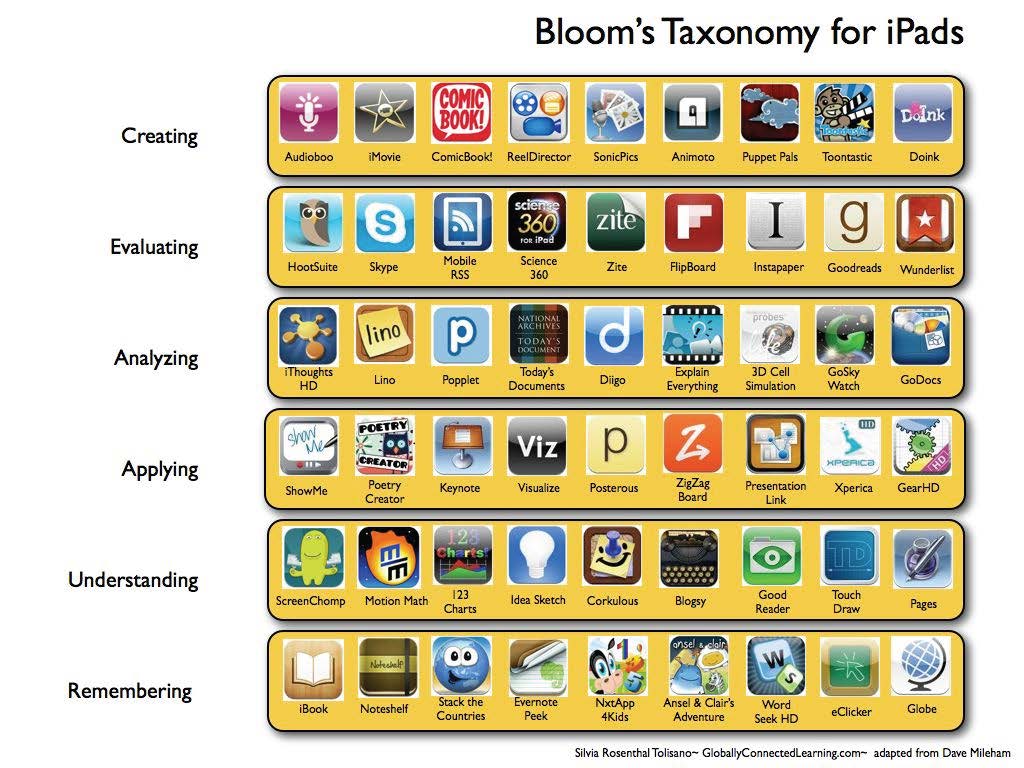

I can already spy half a dozen I want to check out immediately.
Wednesday, January 30, 2013
The ABC's of Issuu
A while back I blogged about some new-to-me tools I stumbled upon when a fellow
During 2012, I frequently posted on Scoop.it! over morning coffee, and I
Found a couple of new blogs to follow through that tool, as well.
Gathering a decent webmix for Symbaloo has taken longer than expected, but I may
Have finally created one worthy of sharing with my students.
ISSUU is my latest and greatest victory.
January was the month grade 1 students finished an inquiry of How We Express Ourselves.
Knowing that alphabet books are one way to structure information, we
Looked at several and read a few during library visits.
Many of the books were a single subject (sports, princesses, animals), but some of the
New books played with the letters in funny and strange ways.
Only after exploring a wide variety some did we attempt to make our own.
Perhaps our product could be better, but this was a first try. Using
Quiet library voices, students brainstormed words for each letter.
Reflection tells me grade 1 students could have written full
Sentences for each letter, but I was worried we would run out of
Time. After each word was illustrated, the cover was designed and all the pages were
Uploaded to ISSUU. It was
Very exciting to see the students' hard work turned into an eBook that
Was even added to our library catalog.
NeXt time we may use an iPad app for the writing and illustrating.... but I have learned
You can't let your perfect get in the way of your good, or you will have
Zero to share.
Blogger's post led me on a birdwalk. Over the past year, I
Committed myself to becoming "fairly proficient" with each of these tools. During 2012, I frequently posted on Scoop.it! over morning coffee, and I
Found a couple of new blogs to follow through that tool, as well.
Gathering a decent webmix for Symbaloo has taken longer than expected, but I may
Have finally created one worthy of sharing with my students.
ISSUU is my latest and greatest victory.
January was the month grade 1 students finished an inquiry of How We Express Ourselves.
Knowing that alphabet books are one way to structure information, we
Looked at several and read a few during library visits.
Many of the books were a single subject (sports, princesses, animals), but some of the
New books played with the letters in funny and strange ways.
Only after exploring a wide variety some did we attempt to make our own.
Quiet library voices, students brainstormed words for each letter.
Reflection tells me grade 1 students could have written full
Sentences for each letter, but I was worried we would run out of
Time. After each word was illustrated, the cover was designed and all the pages were
Uploaded to ISSUU. It was
Very exciting to see the students' hard work turned into an eBook that
Was even added to our library catalog.
NeXt time we may use an iPad app for the writing and illustrating.... but I have learned
You can't let your perfect get in the way of your good, or you will have
Zero to share.
Subscribe to:
Posts (Atom)