Showing posts with label App of the Week. Show all posts
Showing posts with label App of the Week. Show all posts
Friday, August 15, 2014

Tuesday, August 5, 2014
Friday, July 18, 2014
Saturday, June 21, 2014
Friday, May 23, 2014
Friday, May 16, 2014
Friday, May 9, 2014
Friday, May 2, 2014
Appy Friday - GLOSSI
Create an interactive online magazine that can be viewed on any device. Take a look at the Glossi site and Glossi App.
Friday, January 17, 2014
Friday, January 10, 2014
Friday, December 20, 2013
Friday, December 13, 2013
Friday, December 6, 2013
Tuesday, May 7, 2013
App of the Week: Diigo

I first got excited about online bookmarking when I completed a 23 Things course about four years ago. And while I really liked the idea, it fizzled out for me.
Then I took this job, and in February, I found a NEED for social bookmarking (to support our Extended Essay students) as well as a TOOL (via Katy Vance's blog) with which to do so.
At Diigo, I have created "groups" for each of the six Extended Essay general topics. While student use is slow to get off the ground, I can see that some teachers and students have already joined and are adding sites. As I continue to meet with EE groups, I anticipate more will join. But I expect it will really be next year's group that benefits from this tool.
Since joining, I have added Digolet to my Chrome toolbar and downloaded the app. Both are easy to use, but in all honesty, I prefer to use this tool via my computer. The app, however, keeps improving and is an easy way to access my favorite sites while on my iPad.
In addition to curating websites for our six EE groups, I have created a number of lists for myself - library related as well as personal interests. Some are public, others I have chosen to keep private.
I can't put my finger on why this bookmarking site is working for me when others have failed, but Diigo has become my new favorite tool.
What bookmarking tools do you use?
Thursday, April 18, 2013
App of the Week: Follett Destiny
I frequently use Destiny Quest on my iPad to access our catalog while I am in the stacks with students. It's just so.... portable... convenient... and easy.
I love the feature that provides suggested titles - a life saver when the requested title is already checked out or has been mis-shelved.
The idea of an app for the circulation side of things has been on my wish list for quite sometime. Just think... book check-out IN the stacks, IN the hallways or staff rooms, IN the classroom... everywhere things change hands.

In all honesty, it is a little embarrassing to be so late to the table with this post, but I was so thrilled to finally discover this app existed, I just had to share...
The Follett Destiny app was first released last September, and while I am not sure how I missed the news, I know I am not the only librarian who was busy starting a new school year, settling into a new role, learning hundreds of new things each day. If there were blog posts, LM_Net discussions, or Tweets about the release, I missed them all.
Until last week...
I stumbled upon this app while reading what's new in the recent upgrade to Destiny 11.0.
While still somewhat limited, the Follett Destiny app does the basics beautifully. You can:

This is not an app to replace the traditional platform of computer and barcode scanner. When checking out multiple books, one must tap on "scan" for each book. Tap, scan, tap, scan. Not really a problem, but an extra step I am not used to doing. Completing checkout for an entire class of students with multiple books each will obviously take longer than our existing circ desk approach, but scanning the odd book outside of the library has become much, much more convenient.
Another thing I have found is that I need to close the app when I leave it. If I return to Follett Destiny without relaunching, some of the features do not work. Closing and relaunching solves this.
After more use of the app, I realized the problem was me, not the app. You must clear patrons (one tap) between individuals, otherwise it thinks you are searching books.
I read in the app store reviews that some users would like an inventory tab. While this would be a nice feature, bear in mind that items "checked in" during an inventory will be marked "found"... which makes it possible to inventory via the app. However, you will have to tap "scan" between items, and there will be no beeps to alert you when a book is misshelved.
Have you used this app? What do you think of it?
I love the feature that provides suggested titles - a life saver when the requested title is already checked out or has been mis-shelved.
The idea of an app for the circulation side of things has been on my wish list for quite sometime. Just think... book check-out IN the stacks, IN the hallways or staff rooms, IN the classroom... everywhere things change hands.
Follett Destiny
In all honesty, it is a little embarrassing to be so late to the table with this post, but I was so thrilled to finally discover this app existed, I just had to share...
The Follett Destiny app was first released last September, and while I am not sure how I missed the news, I know I am not the only librarian who was busy starting a new school year, settling into a new role, learning hundreds of new things each day. If there were blog posts, LM_Net discussions, or Tweets about the release, I missed them all.
Until last week...
I stumbled upon this app while reading what's new in the recent upgrade to Destiny 11.0.
While still somewhat limited, the Follett Destiny app does the basics beautifully. You can:
- Check books in and out by keying in or scanning barcodes
- Find patrons by scanning library card OR searching by name or id #
- Check patron status
- Check item status

This is not an app to replace the traditional platform of computer and barcode scanner. When checking out multiple books, one must tap on "scan" for each book. Tap, scan, tap, scan. Not really a problem, but an extra step I am not used to doing. Completing checkout for an entire class of students with multiple books each will obviously take longer than our existing circ desk approach, but scanning the odd book outside of the library has become much, much more convenient.
After more use of the app, I realized the problem was me, not the app. You must clear patrons (one tap) between individuals, otherwise it thinks you are searching books.
I read in the app store reviews that some users would like an inventory tab. While this would be a nice feature, bear in mind that items "checked in" during an inventory will be marked "found"... which makes it possible to inventory via the app. However, you will have to tap "scan" between items, and there will be no beeps to alert you when a book is misshelved.
Have you used this app? What do you think of it?
Friday, April 12, 2013
Apps of the Week
I have tried a few new apps recently, but I have not found one that proved to be an indispensible tool for a while....
and then I stumbled across the lists below
from Silvia Rosental Tolisano on Langwitches blog.


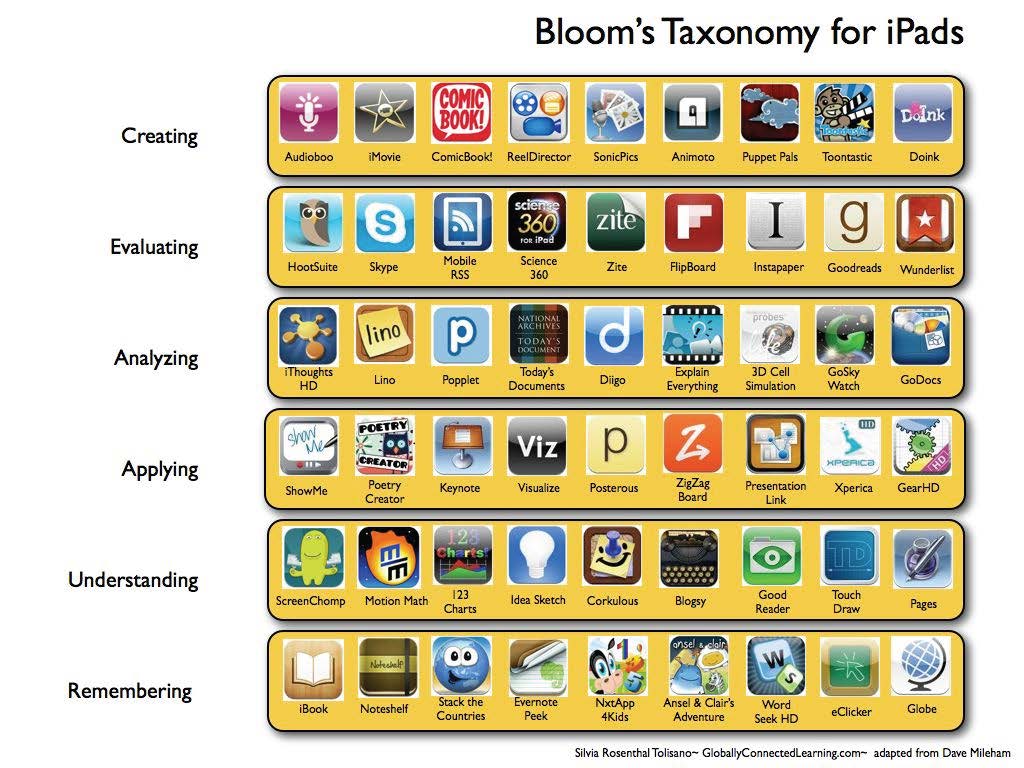

I can already spy half a dozen I want to check out immediately.
Friday, February 1, 2013
App of the week: Dragon Dictation
What do you do with a room full of little ones and a bunch of iPads?
You could have them play games, take photos, or search for library books....
But what about something more ambitious like write reflections or create stories, tasks that require keyboarding skills?

Dragon dictation is a voice-recognition app. It allows the speaker to dictate their thoughts and instantly see them in text. It recognizes a variety of languages...40 at the time of this posting.

Tap the screen to start and tap it again when you're done speaking. Dragon dictation shows you where to speak into your iPad or other mobile device.

Once you've completed your message, you can edit, cut, copy, and paste it into other applications, or send it directly to your favorite social-networking site.
Why leave it just for your first-graders to dictate the stories they want to tell? Use it yourself to create a to-do list, send an e-mail, or create your latest blog post.
You could have them play games, take photos, or search for library books....
But what about something more ambitious like write reflections or create stories, tasks that require keyboarding skills?
Dragon Dictation to the rescue.

Dragon dictation is a voice-recognition app. It allows the speaker to dictate their thoughts and instantly see them in text. It recognizes a variety of languages...40 at the time of this posting.

Tap the screen to start and tap it again when you're done speaking. Dragon dictation shows you where to speak into your iPad or other mobile device.

Once you've completed your message, you can edit, cut, copy, and paste it into other applications, or send it directly to your favorite social-networking site.
Why leave it just for your first-graders to dictate the stories they want to tell? Use it yourself to create a to-do list, send an e-mail, or create your latest blog post.
Friday, January 11, 2013
App of the Week - Inside Voice
Inside Voice by Nonlinear Ideas Inc. has been a big help this week in my library. I don't expect to maintain a silent library, but I do expect students to be respectfully quiet. And for a few students that is a challenge. They just don't realize how loud they are.

This app monitors the noise it around and sounds a programmable alarm whenever the noise level is too high. I have been using the free version, but there is an upgrade available for $0.99 that includes more alarm sounds as well as the ability to record your own sounds.

Home Screen


Noise Over the Limit Noise Below Alarm Level
Friday, December 7, 2012
App of the Week: YALSA's Teen Book Finder
This app has been on my list of must-share's for a few weeks...
YALSA, the American Library Association's young adult division,
has developed a book finder app just for teens.

Each day three titles are highlighted on the homescreen.

Books can be searched in the traditional means of Title and Author,
as well as by Award, Genre, Booklist, and award/booklist Year.

And when teens find something they like, they can locate it at a nearby library by touching the Find It! button (powered by OCLC's World Cat Search).

Add titles to a personal favorites list or share via Twitter and Facebook.
Available for iOS right now, the Android app is due out soon.
What are some of your favorite book apps?
Saturday, December 1, 2012
Apps of the Season
I have been absent for a while, which shall soon be explained, but I couldn't resist resuming my posts with an App of the Week, or in this case, Apps of the Season.
After having issues with syncing my work calendar and my iPad, I found myself browsing Calendar Apps, only to be amazed at offerings....
There are over 1,500 calendar apps to choose from...
And you can track things I never would have dreamt to search....
There are over 1,500 calendar apps to choose from...
And you can track things I never would have dreamt to search....
You can track the moon, remember to pray, choose your baby's gender, clean your house, view a new photo each day, clean your house....
There are calendar apps for hunting and fishing


For tracking holidays and birthdays

For planting your veggies or counting down to baby


And (I can't believe my timing),
a great number of Advent Calendars.... for young and old.
a great number of Advent Calendars.... for young and old.

The two I selected to share are
Advent 2012 (for you)
 Advent 2012 is giving away a free app a day for the next 25 days.
I cannot advise on what you will receive, but I can note that I think it is a fun way to try a few new apps.
MagicSolver.com has done this for few years, and reviews indicate you will find something worthwhile in the countdown.
The Christmas Card Advent Calendar (for children)

 Story Mouse allows young learners to make and email cards
featuring favorite storybook chracters.
I cannot advise on what you will receive, but I can note that I think it is a fun way to try a few new apps.
MagicSolver.com has done this for few years, and reviews indicate you will find something worthwhile in the countdown.
The Christmas Card Advent Calendar (for children)
featuring favorite storybook chracters.
Whether you are counting down to Christmas, or simply counting down to the next vacation,
I wish you a very, Merry December.
Subscribe to:
Posts (Atom)